Warehouse & depot equipment installs

Logistics & warehousing.
Equipment rollouts across every depot.

Integrio tracks the equipment installed in warehouses and depots — EV charge points, solar, racking, automation and IT — from delivery schedule to commissioning, handover and the maintenance tickets that follow.

From £15 per user per month · free 7-day trial, no credit card required

7-day free trialWorks offlineiOS & Android apps
An installer in a hard hat photographing installed equipment on a smartphone
Logistics & Warehousing recordLive
6Depots
48Chargers
3Snags
Depot 4 · Charger bay 12 commissionedUpdated

Serial captured, commissioning form complete, crew signed off. Ready for the handover pack.

How does Integrio help with equipment installs in warehouses and depots?

Integrio tracks each charger, panel, rack component or network device installed across your sites: delivery schedules checked in by QR, serials and data points captured on install, testing and commissioning forms attached to the product, crews on a shared calendar, workflows run per site, then maintenance tickets and warranties against the same installed products.

Last updated 30 September 2026.

01EV charge points
02Depot solar
03Racking & automation
04IT & network

The challenge

Many sites, a lot of kit, and operations that can't stop.

Fitting out a warehouse or rolling equipment out across a depot network means pallets of serialised product arriving at live sites, crews booked around operations, and test records that have to match the kit actually fitted. Spreadsheets and supplier emails can't keep that straight across sites.

01

Deliveries that don't match the order

Chargers, panels, inverters, racking components and network kit arrive in part-loads from different suppliers. Without a delivery schedule per site, short deliveries are found when the crew is already there.

02

Serials lost between site and office

Charger, inverter and switch serials get written on paper or photographed on a phone, so nobody can say what was fitted in which bay or aisle.

03

Commissioning that doesn't tie to the kit

Test and commissioning results sit in separate files, not against the product they describe, so they can't be found when a fault is reported.

04

Crews and pallets on different plans

Installers and subcontractors need to arrive after the kit, and around the site's working hours. A calendar that can't see the delivery schedule books wasted days.

05

Rollouts with no single view

Across many depots, managers can't see which sites are delivered, installed, commissioned or waiting on snags without chasing each team.

06

Handover and maintenance start from scratch

When a charger or conveyor faults months later, the service team needs the same record: which product, which serial, which test, which crew.

One continuous record

Deliver. Install. Commission. Hand over & maintain.

One record per site and per product, so what was ordered, delivered, fitted, tested and handed over is the same list across every depot — and it's still there when the maintenance ticket arrives.

01

Deliver

Build a delivery schedule for each site. Track incoming items from supplier to site, flag incomplete orders and check items in by scanning their QR codes.

02

Install

Schedule crews and subcontractors on a shared calendar with live map and travel time. Installers record serials and data points against each product as it's fitted.

03

Commission

Attach testing and commissioning forms to each product, with mandatory fields that must be completed before project sign-off. Log and close snags with photos.

04

Hand over & maintain

Capture customer sign-off and produce branded reports. Afterwards, maintenance visits, helpdesk tickets and warranty dates sit against the same installed products.

Multi-site rollouts

The kit list, the crews and the commissioning records in one place.

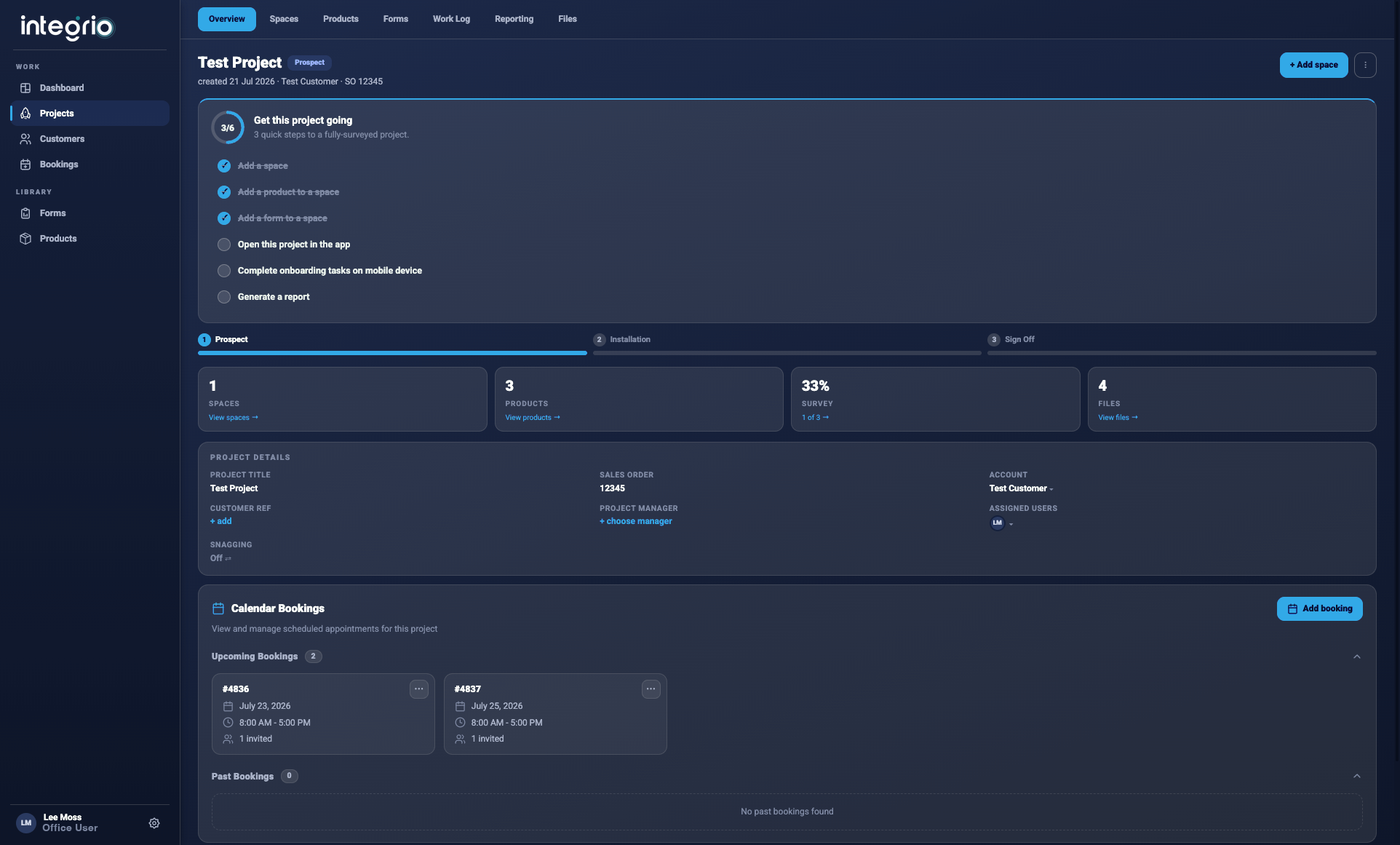
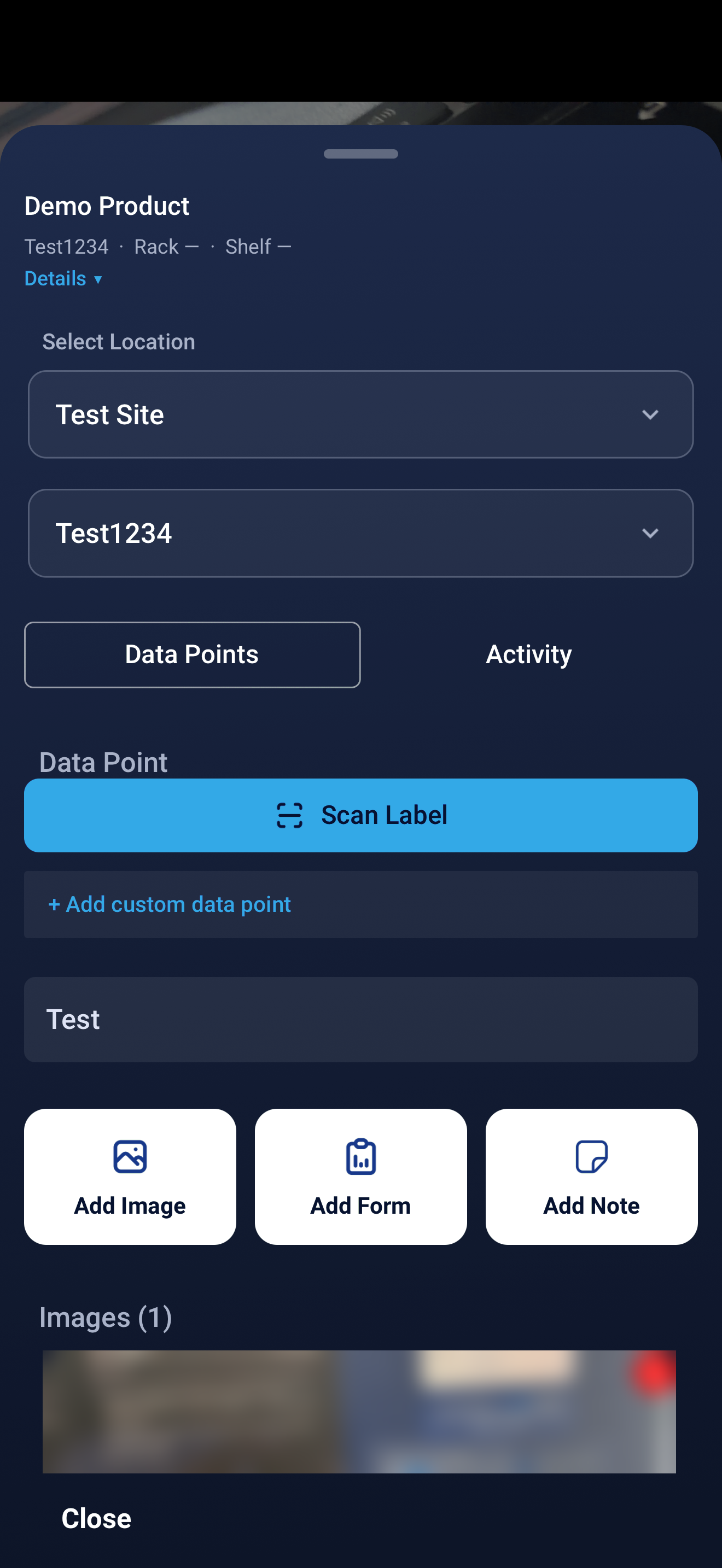
The office builds projects, delivery schedules and workflows in the portal. Installers work from the iOS and Android apps, offline where the warehouse has poor signal, and every serial and test result lands on the product it belongs to.

Kanban workflows with trigger tasks, so the next stage starts when the last one closes

Search every installed product by customer, site or space, with its full history

Branded reports and one-click export of installed products

Logistics & Warehousing workspace in Integrio
Logistics & Warehousing mobile field workflow

Logistics & Warehousing toolkit

Key tools for warehouse and depot installs.

Deliveries

Delivery schedules

Manage deliveries from supplier to site in real time. See what's on order, partial or delivered per project, flag incomplete orders and check items in with QR codes.

Products

Per-product data points

Define the fields each product needs — serial number, rating, IP or MAC address, configuration — and capture them on site against that charger, inverter, switch or controller.

Testing

Testing & commissioning forms

Attach as many forms as you need to a product: testing, commissioning, sign-off. Mandatory fields stop a job being signed off with a gap in the record.

Workflows

Rollout workflows

Run each site through the same Kanban workflow. Trigger tasks start the next stage automatically, and task instructions carry the checklist for each step.

Crews

Crews on the calendar

Schedule installers and subcontractors on a shared calendar with a live map and travel time, and give contractors project-specific access.

Aftercare

Maintenance tickets & warranties

Log faults as helpdesk tickets against the installed product, schedule maintenance visits from the ticket, set SLAs per customer and track warranty periods.

Every update has a place

Every installed product has a place on site.

Installed products are held by customer, site and space, so the charger in bay 12 or the switch in the goods-in comms cabinet can be found with its serials, test forms and helpdesk history attached.

Explore AR & floor plans ↗

Logistics & Warehousing FAQ

Frequently asked questions.

01What does Integrio do for warehouse and depot equipment installs?+

It tracks the products you install and the work around them: delivery schedules, serials and other data points per product, testing and commissioning forms, crews and subcontractors on a calendar, workflows across sites, snagging, sign-off and handover, then maintenance visits, helpdesk tickets and warranty tracking.

02Can we run the same rollout across many sites?+

Yes. Set up your process once as a Kanban workflow with trigger tasks and task instructions, then run each site through it. Installed products are organised by customer, site and space.

03Does Integrio work offline in warehouses?+

Yes. The mobile apps work offline, so installers can capture serials, forms and photos in areas with poor connectivity. Data syncs automatically when the connection is restored.

04Is Integrio a charge point management system?+

No. Integrio is not a charge point back office or CPMS and does not talk OCPP to chargers. It tracks the installation: which charger went where, its serial, its commissioning form, the crew that fitted it and the tickets raised against it afterwards.

05Can subcontractors use Integrio?+

Yes. You can grant contractors and third-party vendors project-specific access with custom permissions, and control what they can view or edit.

See it in your environment

Start your free 7-day trial.